Add your first host, connect, run a command and open SFTP in a few minutes.
This walkthrough uses a demo host. Replace demo, 127.0.0.1 and port 2222 with your own server. You need YourSSH installed and an SSH server you can sign in to.
1
Open the host editor
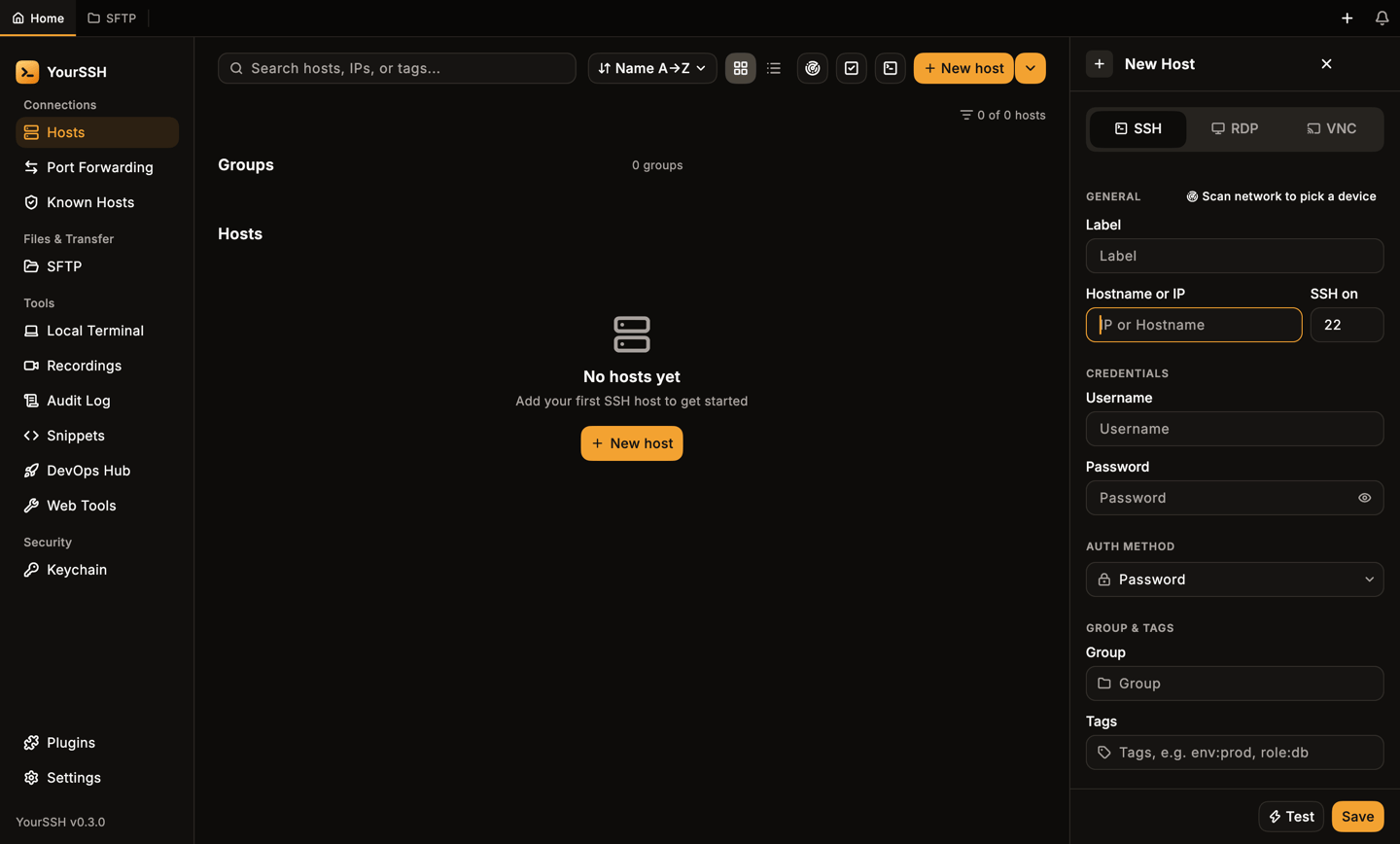
On the Hosts dashboard, click New host. The host editor opens on the right. Keep SSH selected at the top.
The host editor, empty.
2
Fill in the host
Enter a Label (a name you will recognize), the Hostname or IP, the port (default 22), your Username and Password. To use a key or your SSH agent instead, change Auth method. See Hosts for every option.
A filled-in host.
3
Test, then save
Click Test to check the address and credentials without opening a shell. A result such as Connected with a latency appears next to the button. Click Save. The host appears on the dashboard.
The saved host on the dashboard.
4
Connect
Double-click the host card to open a terminal tab (or open its three-dot menu and choose Connect). The first time you connect, YourSSH pins the server’s host key. See Host keys for what that means and when you get a warning.
Hover a card for quick actions: test, SFTP and the full menu.
5
Run a command
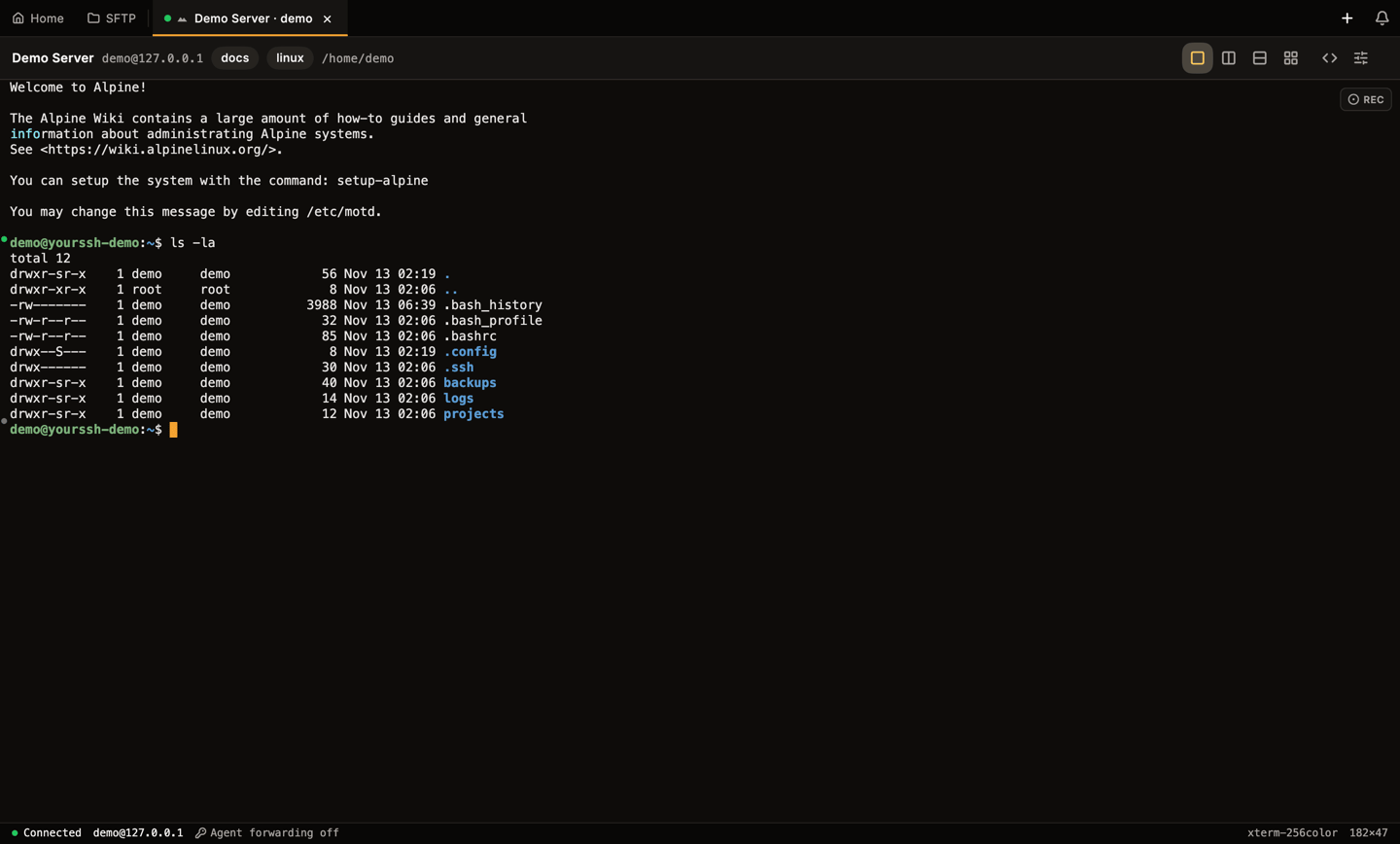
When the shell prompt appears, type a command and press Enter.
A connected terminal after running ls -la.
6
Open SFTP
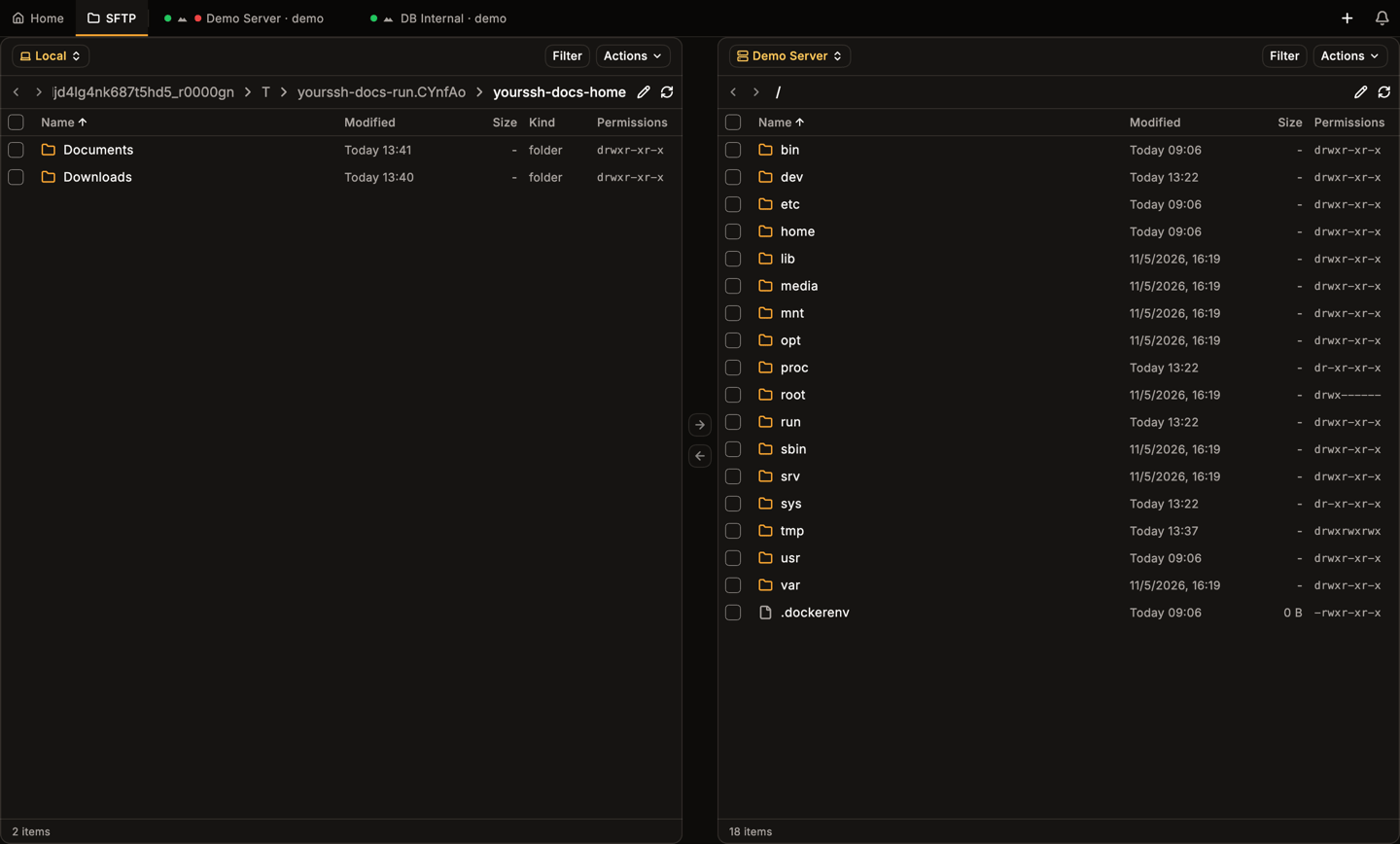
Click the folder icon on the host card, or open the card’s menu and choose SFTP. The dual-panel file manager shows your computer on the left and the server on the right.
Groups, tags, keys, jump hosts and per-host options.
Terminal
Tabs, split view, search and hotkeys.
SFTP
Transfer files in both directions.
Keychain
Generate an SSH key and deploy it to a host.
{"docsConfig":{"theme":"mint","$schema":"https://mintlify.com/docs.json","name":"YourSSH","description":"YourSSH is a fast, open-source SSH, SFTP, RDP and VNC client for macOS, Windows, Linux and Android.","colors":{"primary":"#E87C08","light":"#F3A231","dark":"#C76A06"},"logo":{"light":"https://mintcdn.com/sen-f208ff9e/qEqMDfcJBQhRyoaC/logo/light.svg?fit=max\u0026auto=format\u0026n=qEqMDfcJBQhRyoaC\u0026q=85\u0026s=7bf37a0c27b7602b53d522578cdb816e","dark":"https://mintcdn.com/sen-f208ff9e/qEqMDfcJBQhRyoaC/logo/dark.svg?fit=max\u0026auto=format\u0026n=qEqMDfcJBQhRyoaC\u0026q=85\u0026s=b06507e41d95e5f3cc6fd7080c94ff57","href":"https://github.com/YoursshLabs/yourssh"},"favicon":"https://mintcdn.com/sen-f208ff9e/KwGOqbG40_L2ILah/favicon.svg?fit=max\u0026auto=format\u0026n=KwGOqbG40_L2ILah\u0026q=85\u0026s=8f5150126820f7606a7100cba40b2434","appearance":{"default":"dark"},"navbar":{"links":[{"href":"https://github.com/YoursshLabs/yourssh/issues","label":"Issues"}],"primary":{"type":"button","label":"Download","href":"https://github.com/YoursshLabs/yourssh/releases/latest"}},"footer":{"socials":{"github":"https://github.com/YoursshLabs/yourssh"}},"icons":{"library":"lucide"},"contextual":{"options":["copy","view","chatgpt","claude","perplexity"],"display":"header"},"styling":{"latex":false},"navigation":{"global":{"anchors":[{"anchor":"GitHub","icon":"github","href":"https://github.com/YoursshLabs/yourssh"},{"anchor":"Releases","icon":"download","href":"https://github.com/YoursshLabs/yourssh/releases"}]},"pages":[]}},"deployment":{"deploymentMetadataValue":{"subdomain":"sen-f208ff9e","hasAudioNarration":false,"actualSubdomain":"sen-f208ff9e","customDomains":[],"gitSource":{"type":"github","owner":"yoursshlabs","repo":"docs","deployBranch":"main","contentDirectory":"","isPrivate":false,"mountPath":"","label":"","_id":"6af6c46e9292933daccbb7c4"},"entitlements":{},"buildId":"6af6e34886fb40a3af47152c","clientVersion":"0.0.4124","searchFilterCounts":[{"language":"default","tag":"User guide","count":23},{"language":"default","tag":"Connections","count":6},{"language":"default","tag":"Developer guide","count":5},{"language":"default","tag":"Tools","count":5},{"language":"default","tag":"Develop","count":3},{"language":"default","tag":"Get started","count":3},{"language":"default","tag":"Security","count":3},{"language":"default","tag":"Settings and sync","count":3},{"language":"default","tag":"Plugins","count":2},{"language":"default","tag":"Remote desktop","count":2}]},"assistantConfig":{"enableAskAiButton":false,"enableStarterQuestions":false,"enableContextualStarterQuestions":false,"enableAskAiSearchBar":true},"basePath":"","hasChatPermissions":false,"hasWebMcpPermissions":false,"toggles":[{"name":"kill-isr","enabled":true,"variant":{"name":"disabled","enabled":false,"feature_enabled":true},"impressionData":false},{"name":"custom-rbac-roles","enabled":true,"variant":{"name":"disabled","enabled":false,"feature_enabled":true},"impressionData":false},{"name":"agent-mintlify-slack","enabled":true,"variant":{"name":"disabled","enabled":false,"feature_enabled":true},"impressionData":false},{"name":"agent-integrations-settings","enabled":true,"variant":{"name":"disabled","enabled":false,"feature_enabled":true},"impressionData":false},{"name":"rbac-expansion","enabled":true,"variant":{"name":"disabled","enabled":false,"feature_enabled":true},"impressionData":false},{"name":"automations-pr-grouping","enabled":true,"variant":{"name":"disabled","enabled":false,"feature_enabled":true},"impressionData":false},{"name":"custom-prefix","enabled":true,"variant":{"name":"disabled","enabled":false,"feature_enabled":true},"impressionData":false},{"name":"analytics-v7","enabled":true,"variant":{"name":"disabled","enabled":false,"feature_enabled":true},"impressionData":false},{"name":"user-flows-analytics","enabled":true,"variant":{"name":"disabled","enabled":false,"feature_enabled":true},"impressionData":false},{"name":"no-publish-flow","enabled":true,"variant":{"name":"disabled","enabled":false,"feature_enabled":true},"impressionData":false},{"name":"workos-onboarding","enabled":true,"variant":{"name":"disabled","enabled":false,"feature_enabled":true},"impressionData":false},{"name":"snapshot-serving-live","enabled":true,"variant":{"name":"disabled","enabled":false,"feature_enabled":true},"impressionData":false},{"name":"stripTemperatureMiddleware","enabled":true,"variant":{"name":"disabled","enabled":false,"feature_enabled":true},"impressionData":false},{"name":"support-platform-pylon-zendesk","enabled":true,"variant":{"name":"disabled","enabled":false,"feature_enabled":true},"impressionData":false},{"name":"snapshot-serving","enabled":true,"variant":{"name":"disabled","enabled":false,"feature_enabled":true},"impressionData":false},{"name":"instant-rollback","enabled":true,"variant":{"name":"disabled","enabled":false,"feature_enabled":true},"impressionData":false},{"name":"granular-notifications-server","enabled":true,"variant":{"name":"disabled","enabled":false,"feature_enabled":true},"impressionData":false},{"name":"granular-notifications","enabled":true,"variant":{"name":"disabled","enabled":false,"feature_enabled":true},"impressionData":false},{"name":"automations-fable","enabled":true,"variant":{"name":"disabled","enabled":false,"feature_enabled":true},"impressionData":false},{"name":"fixed-ai-action-pricing","enabled":true,"variant":{"name":"disabled","enabled":false,"feature_enabled":true},"impressionData":false},{"name":"automation-resolve-merge-conflict","enabled":true,"variant":{"name":"disabled","enabled":false,"feature_enabled":true},"impressionData":false},{"name":"scoped-publishing","enabled":true,"variant":{"name":"disabled","enabled":false,"feature_enabled":true},"impressionData":false},{"name":"mintql","enabled":true,"variant":{"name":"disabled","enabled":false,"feature_enabled":true},"impressionData":false},{"name":"page-level-analytics","enabled":true,"variant":{"name":"disabled","enabled":false,"feature_enabled":true},"impressionData":false},{"name":"editor-version-history-v2","enabled":true,"variant":{"name":"disabled","enabled":false,"feature_enabled":true},"impressionData":false},{"name":"billing-page-v2","enabled":true,"variant":{"name":"disabled","enabled":false,"feature_enabled":true},"impressionData":false},{"name":"full-page-search","enabled":true,"variant":{"name":"disabled","enabled":false,"feature_enabled":true},"impressionData":false},{"name":"workspace-projects","enabled":true,"variant":{"name":"disabled","enabled":false,"feature_enabled":true},"impressionData":false},{"name":"assistant-v5","enabled":true,"variant":{"name":"disabled","enabled":false,"feature_enabled":true},"impressionData":false},{"name":"fork-pr-previews","enabled":true,"variant":{"name":"disabled","enabled":false,"feature_enabled":true},"impressionData":false},{"name":"revalidation-jwt","enabled":true,"variant":{"name":"disabled","enabled":false,"feature_enabled":true},"impressionData":false},{"name":"workos-sso-scim","enabled":true,"variant":{"name":"disabled","enabled":false,"feature_enabled":true},"impressionData":false},{"name":"hobby-abuse-scan","enabled":true,"variant":{"name":"disabled","enabled":false,"feature_enabled":true},"impressionData":false},{"name":"dashboard-inbox","enabled":true,"variant":{"name":"disabled","enabled":false,"feature_enabled":true},"impressionData":false},{"name":"workos-signup","enabled":true,"variant":{"name":"disabled","enabled":false,"feature_enabled":true},"impressionData":false},{"name":"turbopuffer-dual-write","enabled":true,"variant":{"name":"disabled","enabled":false,"feature_enabled":true},"impressionData":false},{"name":"workos-enabled","enabled":true,"variant":{"name":"disabled","enabled":false,"feature_enabled":true},"impressionData":false},{"name":"approve-review-flow","enabled":true,"variant":{"name":"disabled","enabled":false,"feature_enabled":true},"impressionData":false},{"name":"editor-metadata","enabled":true,"variant":{"name":"disabled","enabled":false,"feature_enabled":true},"impressionData":false},{"name":"sso-setup-deadline-banner","enabled":true,"variant":{"name":"disabled","enabled":false,"feature_enabled":true},"impressionData":false},{"name":"turbopuffer-serve","enabled":true,"variant":{"name":"disabled","enabled":false,"feature_enabled":true},"impressionData":false},{"name":"live-agents","enabled":true,"variant":{"name":"disabled","enabled":false,"feature_enabled":true},"impressionData":false},{"name":"starter-pricing","enabled":true,"variant":{"name":"control","enabled":true,"payload":{"type":"string","value":"control"},"feature_enabled":true},"impressionData":false},{"name":"llms-txt-v2","enabled":true,"variant":{"name":"disabled","enabled":false,"feature_enabled":true},"impressionData":false}],"googleFontsInlined":false},"customCss":[],"page":{"pagePath":"quickstart","slug":"/quickstart","pageMetadata":{"title":"Quickstart","description":"Add your first host, connect, run a command and open SFTP in a few minutes.","icon":"rocket","href":"/quickstart"},"description":{"compiledSource":"\"use strict\";\nconst {jsx: _jsx} = arguments[0];\nconst {useMDXComponents: _provideComponents} = arguments[0];\nfunction _createMdxContent(props) {\n const _components = {\n p: \"p\",\n ..._provideComponents(),\n ...props.components\n };\n return _jsx(_components.p, {\n children: \"Add your first host, connect, run a command and open SFTP in a few minutes.\"\n });\n}\nfunction MDXContent(props = {}) {\n const {wrapper: MDXLayout} = {\n ..._provideComponents(),\n ...props.components\n };\n return MDXLayout ? _jsx(MDXLayout, {\n ...props,\n children: _jsx(_createMdxContent, {\n ...props\n })\n }) : _createMdxContent(props);\n}\nreturn {\n default: MDXContent\n};\n","frontmatter":{},"scope":{}},"pageType":"default","mdx":{"mdxSource":{"compiledSource":"\"use strict\";const{Fragment:_Fragment,jsx:_jsx,jsxs:_jsxs}=arguments[0];const{useMDXComponents:_provideComponents}=arguments[0];function _createMdxContent(props){const _components={a:`a`,code:`code`,p:`p`,strong:`strong`,..._provideComponents(),...props.components},{Card,CardGroup,Frame,Heading,OptimizedImage,Step,Steps}=_components;if(!Card)_missingMdxReference(`Card`,true);if(!CardGroup)_missingMdxReference(`CardGroup`,true);if(!Frame)_missingMdxReference(`Frame`,true);if(!Heading)_missingMdxReference(`Heading`,true);if(!OptimizedImage)_missingMdxReference(`OptimizedImage`,true);if(!Step)_missingMdxReference(`Step`,true);if(!Steps)_missingMdxReference(`Steps`,true);return _jsxs(_Fragment,{children:[_jsxs(_components.p,{children:[`This walkthrough uses a demo host. Replace `,_jsx(_components.code,{children:`demo`}),`, `,_jsx(_components.code,{children:`127.0.0.1`}),` and port `,_jsx(_components.code,{children:`2222`}),` with your own server. You need `,_jsx(_components.a,{href:`/installation`,children:`YourSSH installed`}),` and an SSH server you can sign in to.`]}),`\n`,_jsxs(Steps,{children:[_jsxs(Step,{title:`Open the host editor`,children:[_jsxs(_components.p,{children:[`On the `,_jsx(_components.strong,{children:`Hosts`}),` dashboard, click `,_jsx(_components.strong,{children:`New host`}),`. The host editor opens on the right. Keep `,_jsx(_components.strong,{children:`SSH`}),` selected at the top.`]}),_jsx(Frame,{caption:`The host editor, empty.`,children:_jsx(OptimizedImage,{src:`https://mintcdn.com/sen-f208ff9e/KwGOqbG40_L2ILah/images/02-add-host/01-new-host-panel.png?fit=max\u0026auto=format\u0026n=KwGOqbG40_L2ILah\u0026q=85\u0026s=59f28b05482ca13c63f02b796265eff3`,alt:`The New Host panel with SSH, RDP and VNC tabs, general and credentials fields`,\"data-og-width\":`1440`,width:`1440`,\"data-og-height\":`868`,height:`868`,\"data-path\":`images/02-add-host/01-new-host-panel.png`,\"data-optimize\":`true`,\"data-opv\":`3`,srcset:`https://mintcdn.com/sen-f208ff9e/KwGOqbG40_L2ILah/images/02-add-host/01-new-host-panel.png?w=280\u0026fit=max\u0026auto=format\u0026n=KwGOqbG40_L2ILah\u0026q=85\u0026s=0d52a185d4d3d9b54a317b1c8a3e15b5 280w, https://mintcdn.com/sen-f208ff9e/KwGOqbG40_L2ILah/images/02-add-host/01-new-host-panel.png?w=560\u0026fit=max\u0026auto=format\u0026n=KwGOqbG40_L2ILah\u0026q=85\u0026s=910e6167704a9f6805200d23cd370300 560w, https://mintcdn.com/sen-f208ff9e/KwGOqbG40_L2ILah/images/02-add-host/01-new-host-panel.png?w=840\u0026fit=max\u0026auto=format\u0026n=KwGOqbG40_L2ILah\u0026q=85\u0026s=7e7d3bd25fa50154efbdfe205e9ede98 840w, https://mintcdn.com/sen-f208ff9e/KwGOqbG40_L2ILah/images/02-add-host/01-new-host-panel.png?w=1100\u0026fit=max\u0026auto=format\u0026n=KwGOqbG40_L2ILah\u0026q=85\u0026s=49a9846b3b5f377f70422087b633b020 1100w, https://mintcdn.com/sen-f208ff9e/KwGOqbG40_L2ILah/images/02-add-host/01-new-host-panel.png?w=1650\u0026fit=max\u0026auto=format\u0026n=KwGOqbG40_L2ILah\u0026q=85\u0026s=a3a9692a6846c779953391f2a93f180d 1650w, https://mintcdn.com/sen-f208ff9e/KwGOqbG40_L2ILah/images/02-add-host/01-new-host-panel.png?w=2500\u0026fit=max\u0026auto=format\u0026n=KwGOqbG40_L2ILah\u0026q=85\u0026s=cb467fc5648f3b8185dd3527e2a3256c 2500w`})})]}),_jsxs(Step,{title:`Fill in the host`,children:[_jsxs(_components.p,{children:[`Enter a `,_jsx(_components.strong,{children:`Label`}),` (a name you will recognize), the `,_jsx(_components.strong,{children:`Hostname or IP`}),`, the port (default `,_jsx(_components.code,{children:`22`}),`), your `,_jsx(_components.strong,{children:`Username`}),` and `,_jsx(_components.strong,{children:`Password`}),`. To use a key or your SSH agent instead, change `,_jsx(_components.strong,{children:`Auth method`}),`. See `,_jsx(_components.a,{href:`/user-guide/hosts`,children:`Hosts`}),` for every option.`]}),_jsx(Frame,{caption:`A filled-in host.`,children:_jsx(OptimizedImage,{src:`https://mintcdn.com/sen-f208ff9e/KwGOqbG40_L2ILah/images/02-add-host/09-filled-form.png?fit=max\u0026auto=format\u0026n=KwGOqbG40_L2ILah\u0026q=85\u0026s=ce4639464c9cb9ee69e44463918aa57e`,alt:`The host editor filled with the label Demo Server, host 127.0.0.1, port 2222 and user demo`,\"data-og-width\":`1440`,width:`1440`,\"data-og-height\":`868`,height:`868`,\"data-path\":`images/02-add-host/09-filled-form.png`,\"data-optimize\":`true`,\"data-opv\":`3`,srcset:`https://mintcdn.com/sen-f208ff9e/KwGOqbG40_L2ILah/images/02-add-host/09-filled-form.png?w=280\u0026fit=max\u0026auto=format\u0026n=KwGOqbG40_L2ILah\u0026q=85\u0026s=b4f42e42eca8fa1eaab4eb62dbc24993 280w, https://mintcdn.com/sen-f208ff9e/KwGOqbG40_L2ILah/images/02-add-host/09-filled-form.png?w=560\u0026fit=max\u0026auto=format\u0026n=KwGOqbG40_L2ILah\u0026q=85\u0026s=00c3ac0e5ea9c49c4333f56b20d1935b 560w, https://mintcdn.com/sen-f208ff9e/KwGOqbG40_L2ILah/images/02-add-host/09-filled-form.png?w=840\u0026fit=max\u0026auto=format\u0026n=KwGOqbG40_L2ILah\u0026q=85\u0026s=c04b29f2122e21aa4b95e38ee9104059 840w, https://mintcdn.com/sen-f208ff9e/KwGOqbG40_L2ILah/images/02-add-host/09-filled-form.png?w=1100\u0026fit=max\u0026auto=format\u0026n=KwGOqbG40_L2ILah\u0026q=85\u0026s=ff14111d56fa6401c1f6943b3693b8aa 1100w, https://mintcdn.com/sen-f208ff9e/KwGOqbG40_L2ILah/images/02-add-host/09-filled-form.png?w=1650\u0026fit=max\u0026auto=format\u0026n=KwGOqbG40_L2ILah\u0026q=85\u0026s=1e92d8ad160493f581bf86b54beaf722 1650w, https://mintcdn.com/sen-f208ff9e/KwGOqbG40_L2ILah/images/02-add-host/09-filled-form.png?w=2500\u0026fit=max\u0026auto=format\u0026n=KwGOqbG40_L2ILah\u0026q=85\u0026s=bd6d386d18d832a7dbe4be78cea1303d 2500w`})})]}),_jsxs(Step,{title:`Test, then save`,children:[_jsxs(_components.p,{children:[`Click `,_jsx(_components.strong,{children:`Test`}),` to check the address and credentials without opening a shell. A result such as `,_jsx(_components.strong,{children:`Connected`}),` with a latency appears next to the button. Click `,_jsx(_components.strong,{children:`Save`}),`. The host appears on the dashboard.`]}),_jsx(Frame,{caption:`The saved host on the dashboard.`,children:_jsx(OptimizedImage,{src:`https://mintcdn.com/sen-f208ff9e/KwGOqbG40_L2ILah/images/02-add-host/11-dashboard-with-host.png?fit=max\u0026auto=format\u0026n=KwGOqbG40_L2ILah\u0026q=85\u0026s=2080a0378f97a35aa8dd990b84a8556d`,alt:`The hosts dashboard with the new Demo Server card inside the DEMO group`,\"data-og-width\":`1440`,width:`1440`,\"data-og-height\":`868`,height:`868`,\"data-path\":`images/02-add-host/11-dashboard-with-host.png`,\"data-optimize\":`true`,\"data-opv\":`3`,srcset:`https://mintcdn.com/sen-f208ff9e/KwGOqbG40_L2ILah/images/02-add-host/11-dashboard-with-host.png?w=280\u0026fit=max\u0026auto=format\u0026n=KwGOqbG40_L2ILah\u0026q=85\u0026s=ddc9c011a8b8cd1322eac292d897c147 280w, https://mintcdn.com/sen-f208ff9e/KwGOqbG40_L2ILah/images/02-add-host/11-dashboard-with-host.png?w=560\u0026fit=max\u0026auto=format\u0026n=KwGOqbG40_L2ILah\u0026q=85\u0026s=93c4fcb0074588e39764e55cb5a89346 560w, https://mintcdn.com/sen-f208ff9e/KwGOqbG40_L2ILah/images/02-add-host/11-dashboard-with-host.png?w=840\u0026fit=max\u0026auto=format\u0026n=KwGOqbG40_L2ILah\u0026q=85\u0026s=43449faed7858749792c523922ea9880 840w, https://mintcdn.com/sen-f208ff9e/KwGOqbG40_L2ILah/images/02-add-host/11-dashboard-with-host.png?w=1100\u0026fit=max\u0026auto=format\u0026n=KwGOqbG40_L2ILah\u0026q=85\u0026s=e5dd798f73c6f79df924d91e4892f0ec 1100w, https://mintcdn.com/sen-f208ff9e/KwGOqbG40_L2ILah/images/02-add-host/11-dashboard-with-host.png?w=1650\u0026fit=max\u0026auto=format\u0026n=KwGOqbG40_L2ILah\u0026q=85\u0026s=b0ab394ff310a89dfe74d41bffffeea9 1650w, https://mintcdn.com/sen-f208ff9e/KwGOqbG40_L2ILah/images/02-add-host/11-dashboard-with-host.png?w=2500\u0026fit=max\u0026auto=format\u0026n=KwGOqbG40_L2ILah\u0026q=85\u0026s=8a5108d559c520e8776bf7d7932ea331 2500w`})})]}),_jsxs(Step,{title:`Connect`,children:[_jsxs(_components.p,{children:[`Double-click the host card to open a terminal tab (or open its three-dot menu and choose `,_jsx(_components.strong,{children:`Connect`}),`). The first time you connect, YourSSH pins the server’s host key. See `,_jsx(_components.a,{href:`/user-guide/host-keys`,children:`Host keys`}),` for what that means and when you get a warning.`]}),_jsx(Frame,{caption:`Hover a card for quick actions: test, SFTP and the full menu.`,children:_jsx(OptimizedImage,{src:`https://mintcdn.com/sen-f208ff9e/KwGOqbG40_L2ILah/images/03-first-connect/02-card-hover-actions.png?fit=max\u0026auto=format\u0026n=KwGOqbG40_L2ILah\u0026q=85\u0026s=39a9746880e7c59609e25e5be0b827d7`,alt:`A host card with the test, SFTP and more-actions buttons visible on hover`,\"data-og-width\":`1440`,width:`1440`,\"data-og-height\":`868`,height:`868`,\"data-path\":`images/03-first-connect/02-card-hover-actions.png`,\"data-optimize\":`true`,\"data-opv\":`3`,srcset:`https://mintcdn.com/sen-f208ff9e/KwGOqbG40_L2ILah/images/03-first-connect/02-card-hover-actions.png?w=280\u0026fit=max\u0026auto=format\u0026n=KwGOqbG40_L2ILah\u0026q=85\u0026s=2c2c3e1810ddd6e2c6396fb5e681d97a 280w, https://mintcdn.com/sen-f208ff9e/KwGOqbG40_L2ILah/images/03-first-connect/02-card-hover-actions.png?w=560\u0026fit=max\u0026auto=format\u0026n=KwGOqbG40_L2ILah\u0026q=85\u0026s=cf9dab51cf253e10473e2a5516b11528 560w, https://mintcdn.com/sen-f208ff9e/KwGOqbG40_L2ILah/images/03-first-connect/02-card-hover-actions.png?w=840\u0026fit=max\u0026auto=format\u0026n=KwGOqbG40_L2ILah\u0026q=85\u0026s=4ee22c925e87aca6941eb1eb66d06c71 840w, https://mintcdn.com/sen-f208ff9e/KwGOqbG40_L2ILah/images/03-first-connect/02-card-hover-actions.png?w=1100\u0026fit=max\u0026auto=format\u0026n=KwGOqbG40_L2ILah\u0026q=85\u0026s=5b82796ec34d02f304db7372d4f643f5 1100w, https://mintcdn.com/sen-f208ff9e/KwGOqbG40_L2ILah/images/03-first-connect/02-card-hover-actions.png?w=1650\u0026fit=max\u0026auto=format\u0026n=KwGOqbG40_L2ILah\u0026q=85\u0026s=5bfd4ad5951e8ae09539b9718c137f6d 1650w, https://mintcdn.com/sen-f208ff9e/KwGOqbG40_L2ILah/images/03-first-connect/02-card-hover-actions.png?w=2500\u0026fit=max\u0026auto=format\u0026n=KwGOqbG40_L2ILah\u0026q=85\u0026s=70c30a027977229f308eb612792ea0aa 2500w`})})]}),_jsxs(Step,{title:`Run a command`,children:[_jsx(_components.p,{children:`When the shell prompt appears, type a command and press Enter.`}),_jsx(Frame,{caption:`A connected terminal after running ls -la.`,children:_jsx(OptimizedImage,{src:`https://mintcdn.com/sen-f208ff9e/KwGOqbG40_L2ILah/images/03-first-connect/07-terminal-ls.png?fit=max\u0026auto=format\u0026n=KwGOqbG40_L2ILah\u0026q=85\u0026s=1bacfefc08e081a8a162e1c671d5905b`,alt:`A terminal tab connected to Demo Server, showing the output of ls -la`,\"data-og-width\":`1440`,width:`1440`,\"data-og-height\":`868`,height:`868`,\"data-path\":`images/03-first-connect/07-terminal-ls.png`,\"data-optimize\":`true`,\"data-opv\":`3`,srcset:`https://mintcdn.com/sen-f208ff9e/KwGOqbG40_L2ILah/images/03-first-connect/07-terminal-ls.png?w=280\u0026fit=max\u0026auto=format\u0026n=KwGOqbG40_L2ILah\u0026q=85\u0026s=786d211b2da910ca35026d9da5b20193 280w, https://mintcdn.com/sen-f208ff9e/KwGOqbG40_L2ILah/images/03-first-connect/07-terminal-ls.png?w=560\u0026fit=max\u0026auto=format\u0026n=KwGOqbG40_L2ILah\u0026q=85\u0026s=8b64ad51a514f196afa6acb7e25e3e7f 560w, https://mintcdn.com/sen-f208ff9e/KwGOqbG40_L2ILah/images/03-first-connect/07-terminal-ls.png?w=840\u0026fit=max\u0026auto=format\u0026n=KwGOqbG40_L2ILah\u0026q=85\u0026s=a8a232f8e1166c7caeb1befa4d04f595 840w, https://mintcdn.com/sen-f208ff9e/KwGOqbG40_L2ILah/images/03-first-connect/07-terminal-ls.png?w=1100\u0026fit=max\u0026auto=format\u0026n=KwGOqbG40_L2ILah\u0026q=85\u0026s=6bef46931aa562cfb8ffa11600a038f8 1100w, https://mintcdn.com/sen-f208ff9e/KwGOqbG40_L2ILah/images/03-first-connect/07-terminal-ls.png?w=1650\u0026fit=max\u0026auto=format\u0026n=KwGOqbG40_L2ILah\u0026q=85\u0026s=77280c388ca4c1b2eee2ec0361654238 1650w, https://mintcdn.com/sen-f208ff9e/KwGOqbG40_L2ILah/images/03-first-connect/07-terminal-ls.png?w=2500\u0026fit=max\u0026auto=format\u0026n=KwGOqbG40_L2ILah\u0026q=85\u0026s=54a2ee5d464d46039abd8b9f249dd109 2500w`})})]}),_jsxs(Step,{title:`Open SFTP`,children:[_jsxs(_components.p,{children:[`Click the folder icon on the host card, or open the card’s menu and choose `,_jsx(_components.strong,{children:`SFTP`}),`. The dual-panel file manager shows your computer on the left and the server on the right.`]}),_jsx(Frame,{caption:`Dual-panel SFTP.`,children:_jsx(OptimizedImage,{src:`https://mintcdn.com/sen-f208ff9e/KwGOqbG40_L2ILah/images/07-sftp/03-dual-panel.png?fit=max\u0026auto=format\u0026n=KwGOqbG40_L2ILah\u0026q=85\u0026s=ffe25b0de5d7cdebbbd8923b0b22913f`,alt:`The SFTP screen with the local home folder on the left and the remote home folder on the right`,\"data-og-width\":`1440`,width:`1440`,\"data-og-height\":`868`,height:`868`,\"data-path\":`images/07-sftp/03-dual-panel.png`,\"data-optimize\":`true`,\"data-opv\":`3`,srcset:`https://mintcdn.com/sen-f208ff9e/KwGOqbG40_L2ILah/images/07-sftp/03-dual-panel.png?w=280\u0026fit=max\u0026auto=format\u0026n=KwGOqbG40_L2ILah\u0026q=85\u0026s=3fe68cb11ae18d38f49364c558c252c9 280w, https://mintcdn.com/sen-f208ff9e/KwGOqbG40_L2ILah/images/07-sftp/03-dual-panel.png?w=560\u0026fit=max\u0026auto=format\u0026n=KwGOqbG40_L2ILah\u0026q=85\u0026s=2bc12cd846577f916237e2aa1da1d4c2 560w, https://mintcdn.com/sen-f208ff9e/KwGOqbG40_L2ILah/images/07-sftp/03-dual-panel.png?w=840\u0026fit=max\u0026auto=format\u0026n=KwGOqbG40_L2ILah\u0026q=85\u0026s=c5e60c993c71135afb6c9e2c85ee86cf 840w, https://mintcdn.com/sen-f208ff9e/KwGOqbG40_L2ILah/images/07-sftp/03-dual-panel.png?w=1100\u0026fit=max\u0026auto=format\u0026n=KwGOqbG40_L2ILah\u0026q=85\u0026s=c3c61d5a17973c754b30b341fcf8beb6 1100w, https://mintcdn.com/sen-f208ff9e/KwGOqbG40_L2ILah/images/07-sftp/03-dual-panel.png?w=1650\u0026fit=max\u0026auto=format\u0026n=KwGOqbG40_L2ILah\u0026q=85\u0026s=64badd55cab3fdba6a352600905bf5ef 1650w, https://mintcdn.com/sen-f208ff9e/KwGOqbG40_L2ILah/images/07-sftp/03-dual-panel.png?w=2500\u0026fit=max\u0026auto=format\u0026n=KwGOqbG40_L2ILah\u0026q=85\u0026s=b0447779153f8157792a281706d0edad 2500w`})})]})]}),`\n`,_jsx(Heading,{level:`2`,id:`next-steps`,children:`Next steps`}),`\n`,_jsxs(CardGroup,{cols:2,children:[_jsx(Card,{title:`Hosts`,icon:`server`,href:`/user-guide/hosts`,children:_jsx(_components.p,{children:`Groups, tags, keys, jump hosts and per-host options.`})}),_jsx(Card,{title:`Terminal`,icon:`square-terminal`,href:`/user-guide/terminal`,children:_jsx(_components.p,{children:`Tabs, split view, search and hotkeys.`})}),_jsx(Card,{title:`SFTP`,icon:`folder-open`,href:`/user-guide/sftp`,children:_jsx(_components.p,{children:`Transfer files in both directions.`})}),_jsx(Card,{title:`Keychain`,icon:`key-round`,href:`/user-guide/keychain`,children:_jsx(_components.p,{children:`Generate an SSH key and deploy it to a host.`})})]})]})}function MDXContent(props={}){const{wrapper:MDXLayout}={..._provideComponents(),...props.components};return MDXLayout?_jsx(MDXLayout,{...props,children:_jsx(_createMdxContent,{...props})}):_createMdxContent(props)}return{default:MDXContent};function _missingMdxReference(id,component){throw new Error(`Expected `+(component?`component`:`object`)+\" `\"+id+\"` to be defined: you likely forgot to import, pass, or provide it.\")}","frontmatter":{},"scope":{"config":{},"pageMetadata":{"title":"Quickstart","description":"Add your first host, connect, run a command and open SFTP in a few minutes.","icon":"rocket","href":"/quickstart"}}},"mdxSourceWithNoJs":null},"mdxExtracts":{"tableOfContents":[{"title":"Next steps","slug":"next-steps","depth":2,"children":[]}],"codeExamples":{}},"jsLinks":[],"subdomain":"sen-f208ff9e","siteName":"YourSSH","title":"Quickstart - YourSSH","navMaps":{"firstHrefInVersion":{},"firstHrefInLanguage":{}},"lastModified":"2026-11-13T08:54:47.032Z","originalFileLocation":"quickstart.mdx"},"headHtml":"\u003cscript data-mint-head>(function(){var d=document.documentElement,p=null;if(!p){try{p=localStorage.getItem(\"isDarkMode\")}catch(e){}if(p==='true')p='dark';else if(p==='false')p='light';if(p!=='light'\u0026\u0026p!=='dark'\u0026\u0026p!=='system')p=\"dark\"}var r=p==='system'?(matchMedia(\"(prefers-color-scheme: dark)\").matches?'dark':'light'):p;d.classList.remove(r==='dark'?'light':'dark');d.classList.add(r);d.setAttribute(\"data-theme-preference\",p)})();\u003c/script>\u003cmeta data-mint-head name=\"description\" content=\"Add your first host, connect, run a command and open SFTP in a few minutes.\">\u003cmeta data-mint-head name=\"application-name\" content=\"YourSSH\">\u003cmeta data-mint-head name=\"generator\" content=\"Mintlify\">\u003clink data-mint-head rel=\"icon\" type=\"image/png\" sizes=\"192x192\" href=\"/mintlify-assets/_mintlify/favicons/sen-f208ff9e/SKoU7AxwHJ7tyeF-/_generated/favicon/android-chrome-192x192.png\" media=\"(prefers-color-scheme: light)\">\u003clink data-mint-head rel=\"apple-touch-icon\" type=\"image/png\" sizes=\"180x180\" href=\"/mintlify-assets/_mintlify/favicons/sen-f208ff9e/SKoU7AxwHJ7tyeF-/_generated/favicon/apple-touch-icon.png\">\u003clink data-mint-head rel=\"icon\" type=\"image/png\" sizes=\"16x16\" href=\"/mintlify-assets/_mintlify/favicons/sen-f208ff9e/SKoU7AxwHJ7tyeF-/_generated/favicon/favicon-16x16.png\" media=\"(prefers-color-scheme: light)\">\u003clink data-mint-head rel=\"icon\" type=\"image/png\" sizes=\"32x32\" href=\"/mintlify-assets/_mintlify/favicons/sen-f208ff9e/SKoU7AxwHJ7tyeF-/_generated/favicon/favicon-32x32.png\" media=\"(prefers-color-scheme: light)\">\u003clink data-mint-head rel=\"shortcut icon\" type=\"image/x-icon\" href=\"/mintlify-assets/_mintlify/favicons/sen-f208ff9e/SKoU7AxwHJ7tyeF-/_generated/favicon/favicon.ico\" media=\"(prefers-color-scheme: light)\">\u003clink data-mint-head rel=\"icon\" type=\"image/png\" sizes=\"192x192\" href=\"/mintlify-assets/_mintlify/favicons/sen-f208ff9e/SKoU7AxwHJ7tyeF-/_generated/favicon-dark/android-chrome-192x192.png\" media=\"(prefers-color-scheme: dark)\">\u003clink data-mint-head rel=\"icon\" type=\"image/png\" sizes=\"16x16\" href=\"/mintlify-assets/_mintlify/favicons/sen-f208ff9e/SKoU7AxwHJ7tyeF-/_generated/favicon-dark/favicon-16x16.png\" media=\"(prefers-color-scheme: dark)\">\u003clink data-mint-head rel=\"icon\" type=\"image/png\" sizes=\"32x32\" href=\"/mintlify-assets/_mintlify/favicons/sen-f208ff9e/SKoU7AxwHJ7tyeF-/_generated/favicon-dark/favicon-32x32.png\" media=\"(prefers-color-scheme: dark)\">\u003clink data-mint-head rel=\"shortcut icon\" type=\"image/x-icon\" href=\"/mintlify-assets/_mintlify/favicons/sen-f208ff9e/SKoU7AxwHJ7tyeF-/_generated/favicon-dark/favicon.ico\" media=\"(prefers-color-scheme: dark)\">\u003cmeta data-mint-head property=\"og:title\" content=\"Quickstart - YourSSH\">\u003cmeta data-mint-head property=\"og:description\" content=\"Add your first host, connect, run a command and open SFTP in a few minutes.\">\u003cmeta data-mint-head property=\"og:site_name\" content=\"YourSSH\">\u003cmeta data-mint-head property=\"og:url\" content=\"https://sen-f208ff9e.mintlify.app/quickstart\">\u003cmeta data-mint-head property=\"og:type\" content=\"website\">\u003cmeta data-mint-head property=\"og:image\" content=\"https://sen-f208ff9e.mintlify.site/_mintlify/api/og/v2?division=Get+started\u0026amp;title=Quickstart\u0026amp;description=Add+your+first+host%2C+connect%2C+run+a+command+and+open+SFTP+in+a+few+minutes.\u0026amp;theme=9c28b55d71a4be955ba27112\u0026amp;signature=1299efb03a0bd9d14ca3ee495d5f5a546d530aa404422464a30f2ed0d143e5aa\">\u003cmeta data-mint-head property=\"og:image:width\" content=\"1200\">\u003cmeta data-mint-head property=\"og:image:height\" content=\"630\">\u003cmeta data-mint-head name=\"twitter:card\" content=\"summary_large_image\">\u003cmeta data-mint-head name=\"twitter:title\" content=\"Quickstart - YourSSH\">\u003cmeta data-mint-head name=\"twitter:description\" content=\"Add your first host, connect, run a command and open SFTP in a few minutes.\">\u003cmeta data-mint-head name=\"twitter:image\" content=\"https://sen-f208ff9e.mintlify.site/_mintlify/api/og/v2?division=Get+started\u0026amp;title=Quickstart\u0026amp;description=Add+your+first+host%2C+connect%2C+run+a+command+and+open+SFTP+in+a+few+minutes.\u0026amp;theme=9c28b55d71a4be955ba27112\u0026amp;signature=1299efb03a0bd9d14ca3ee495d5f5a546d530aa404422464a30f2ed0d143e5aa\">\u003cmeta data-mint-head name=\"twitter:image:width\" content=\"1200\">\u003cmeta data-mint-head name=\"twitter:image:height\" content=\"630\">\u003cmeta data-mint-head name=\"msapplication-config\" content=\"/mintlify-assets/_mintlify/favicons/sen-f208ff9e/SKoU7AxwHJ7tyeF-/_generated/favicon/browserconfig.xml\">\u003cmeta data-mint-head name=\"apple-mobile-web-app-title\" content=\"YourSSH\">\u003cmeta data-mint-head name=\"msapplication-TileColor\" content=\"#E87C08\">\u003clink data-mint-head rel=\"canonical\" href=\"https://sen-f208ff9e.mintlify.app/quickstart\">\u003clink data-mint-head rel=\"alternate\" type=\"application/xml\" href=\"/sitemap.xml\">\u003clink data-mint-head rel=\"alternate\" type=\"text/markdown\" href=\"/quickstart.md\">\u003cscript data-mint-head type=\"application/ld+json\">{\"@context\":\"https://schema.org\",\"@graph\":[{\"@type\":\"Organization\",\"@id\":\"https://sen-f208ff9e.mintlify.app/#organization\",\"name\":\"YourSSH\",\"url\":\"https://sen-f208ff9e.mintlify.app\",\"logo\":{\"@type\":\"ImageObject\",\"url\":\"https://mintcdn.com/sen-f208ff9e/qEqMDfcJBQhRyoaC/logo/light.svg?fit=max\u0026auto=format\u0026n=qEqMDfcJBQhRyoaC\u0026q=85\u0026s=7bf37a0c27b7602b53d522578cdb816e\"}},{\"@type\":\"WebSite\",\"@id\":\"https://sen-f208ff9e.mintlify.app#website\",\"name\":\"YourSSH\",\"url\":\"https://sen-f208ff9e.mintlify.app\",\"publisher\":{\"@id\":\"https://sen-f208ff9e.mintlify.app/#organization\"}},{\"@type\":\"WebPage\",\"@id\":\"https://sen-f208ff9e.mintlify.app/quickstart#webpage\",\"url\":\"https://sen-f208ff9e.mintlify.app/quickstart\",\"name\":\"Quickstart\",\"description\":\"Add your first host, connect, run a command and open SFTP in a few minutes.\",\"dateModified\":\"2026-11-13T08:54:47.032Z\",\"isPartOf\":{\"@id\":\"https://sen-f208ff9e.mintlify.app#website\"},\"breadcrumb\":{\"@id\":\"https://sen-f208ff9e.mintlify.app/quickstart#breadcrumb\"}},{\"@type\":\"BreadcrumbList\",\"@id\":\"https://sen-f208ff9e.mintlify.app/quickstart#breadcrumb\",\"itemListElement\":[{\"@type\":\"ListItem\",\"position\":1,\"name\":\"Get started\",\"item\":\"https://sen-f208ff9e.mintlify.app\"},{\"@type\":\"ListItem\",\"position\":2,\"name\":\"Quickstart\",\"item\":\"https://sen-f208ff9e.mintlify.app/quickstart\"}]},{\"@type\":[\"Article\",\"TechArticle\"],\"@id\":\"https://sen-f208ff9e.mintlify.app/quickstart#article\",\"headline\":\"Quickstart\",\"name\":\"Quickstart\",\"description\":\"Add your first host, connect, run a command and open SFTP in a few minutes.\",\"url\":\"https://sen-f208ff9e.mintlify.app/quickstart\",\"mainEntityOfPage\":{\"@id\":\"https://sen-f208ff9e.mintlify.app/quickstart#webpage\"},\"dateModified\":\"2026-11-13T08:54:47.032Z\",\"publisher\":{\"@id\":\"https://sen-f208ff9e.mintlify.app/#organization\"},\"isPartOf\":{\"@id\":\"https://sen-f208ff9e.mintlify.app#website\"}}]}\u003c/script>\u003cscript data-mint-head type=\"application/ld+json\">{\"@context\":\"https://schema.org\",\"@type\":\"WebSite\",\"name\":\"YourSSH\",\"publisher\":{\"@type\":\"Organization\",\"name\":\"YourSSH\"},\"provider\":{\"@type\":\"Organization\",\"name\":\"Mintlify\",\"url\":\"https://mintlify.com\"}}\u003c/script>","agentPointerHref":"/quickstart.md","siteName":"YourSSH","nav":{"global":{"anchors":[{"anchor":"GitHub","icon":"github","href":"https://github.com/YoursshLabs/yourssh"},{"anchor":"Releases","icon":"download","href":"https://github.com/YoursshLabs/yourssh/releases"}]},"tabs":[{"tab":"User guide","groups":[{"group":"Get started","pages":[{"title":"Introduction","icon":"terminal","href":""},{"title":"Installation","description":"Download and install YourSSH on macOS, Windows, Linux or Android.","icon":"download","href":"/installation"},{"title":"Quickstart","icon":"rocket","href":"/quickstart"}]},{"group":"Connections","pages":[{"title":"Hosts","description":"Organize saved SSH, RDP and VNC hosts on the dashboard and configure each one in the host editor.","icon":"server","href":"/user-guide/hosts"},{"title":"Host keys","icon":"shield-check","href":"/user-guide/host-keys"},{"title":"Terminal","icon":"terminal","href":"/user-guide/terminal"},{"title":"Terminal sharing","icon":"screen-share","href":"/user-guide/terminal-sharing"},{"title":"Bulk actions","icon":"layers","href":"/user-guide/bulk-actions"},{"title":"Port forwarding","icon":"arrow-left-right","href":"/user-guide/port-forwarding"}]},{"group":"Files","pages":[{"title":"SFTP","icon":"folder","href":"/user-guide/sftp"}]},{"group":"Remote desktop","pages":[{"title":"RDP remote desktop","icon":"monitor","href":"/user-guide/rdp"},{"title":"VNC remote desktop","icon":"cast","href":"/user-guide/vnc"}]},{"group":"Security","pages":[{"title":"Keychain and credentials","icon":"key","href":"/user-guide/keychain"},{"title":"Session recording","icon":"video","href":"/user-guide/recording"},{"title":"Audit log","icon":"scroll-text","href":"/user-guide/audit-log"}]},{"group":"Tools","pages":[{"title":"Snippets","icon":"code","href":"/user-guide/snippets"},{"title":"AI assistant","icon":"bot","href":"/user-guide/ai-chat"},{"title":"DevOps Hub","icon":"rocket","href":"/user-guide/devops"},{"title":"Web tools","icon":"wrench","href":"/user-guide/web-tools"},{"title":"Command line and links","icon":"square-terminal","href":"/user-guide/cli"}]},{"group":"Settings and sync","pages":[{"title":"Settings","icon":"settings","href":"/user-guide/settings"},{"title":"Sync and device transfer","icon":"refresh-cw","href":"/user-guide/sync"},{"title":"YourSSH for Android","icon":"smartphone","href":"/user-guide/mobile"}]}]},{"tab":"Developer guide","pages":[{"title":"Developer guide","href":"/developer-guide/architecture"}]},{"tab":"Release notes","pages":[{"title":"Release notes","href":"/release-notes"}]}]},"basePath":"","title":"Quickstart - YourSSH","buildId":"dpl_8hoxaqFTU7hTr6A2fUraxAyjuiZo","deploymentId":"dpl_8hoxaqFTU7hTr6A2fUraxAyjuiZo","dynamics":["07c022d89b","a74be98ba7"],"chunks":["Frame-Dmj010Ph.js","DynamicMarkdown-GHvayGOn.js","zoom-image-lightbox-8gCTkA22.js","lightbox-handle-r17bVUz3.js"]}